
Analytical modelling
Spaces, panels, apertures, adjacency, materials, constructions, profiles, internal conditions, systems and results in one model — inspected and edited in the SAM desktop apps.
SAM is an open-source computational-engineering platform built around a shared analytical building model. It connects BIM, building physics, HVAC systems and simulation through reusable, traceable workflows.
Design tools feed a shared analytical building model. Engineering logic, systems and simulation all work on that model, and their results return to it.
SAM analytical modelSpaces, panels, apertures, adjacency, constructions, profiles, internal conditions, systems and results — one open JSON model, reused rather than rebuilt.
Grasshopper is one host for SAM, not SAM itself. Tas is one simulation integration, not SAM itself.
What makes it different
Six capability families, each built on the same analytical model and implemented in public repositories.
Spaces, panels, apertures, adjacency, materials, constructions, profiles, internal conditions, systems and results in one model — inspected and edited in the SAM desktop apps.
Analytical models from Revit 2025–2027 and Rhino 8/9, with IFC, gbXML, IES VE GEM, BHoM and Ladybug Tools exchange. A watertight Open Cascade geometry kernel is in development.
Loads, ventilation, overheating and thermal-simulation workflows on the model, including Part F ventilation traced to Approved Document F and Part O overheating assessed with CIBSE TM59.
Building systems as explicit engineering networks: plant rooms, air handling and ventilation, catalogue equipment selection, and psychrometric air processes on the Mollier chart.
Tas integration for zone and systems simulation, with results read back onto the analytical model. Native OpenStudio conversion is in development.
Repeatable, scriptable workflows: a large Grasshopper component library, .NET APIs, scenarios run in series or in parallel, and data exchange for large models.
More modules, including the installer and release pipeline, are in the SAM-BIM organisation.
A three-dwelling model taken from ventilation requirement to overheating result. The analytical model, engineering logic, equipment data and simulation work together; each image is a real SAM screen.
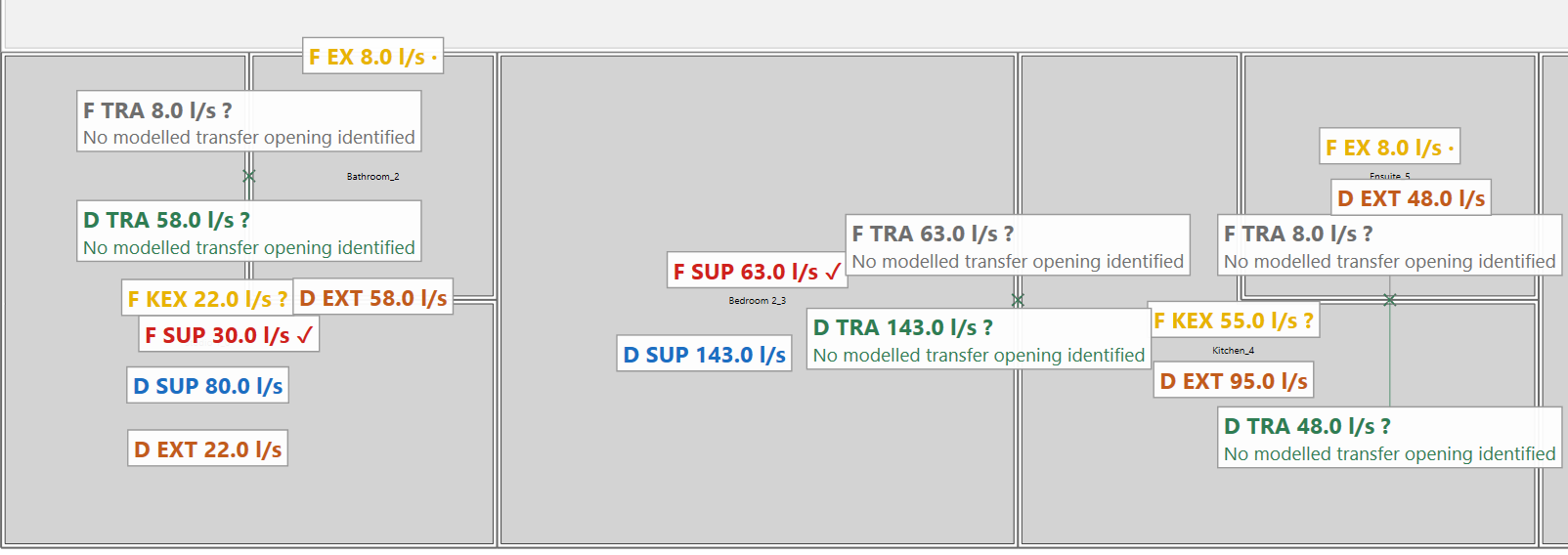
SAM derives the Approved Document F airflow for each room from the model and shows it on the plan beside the design.
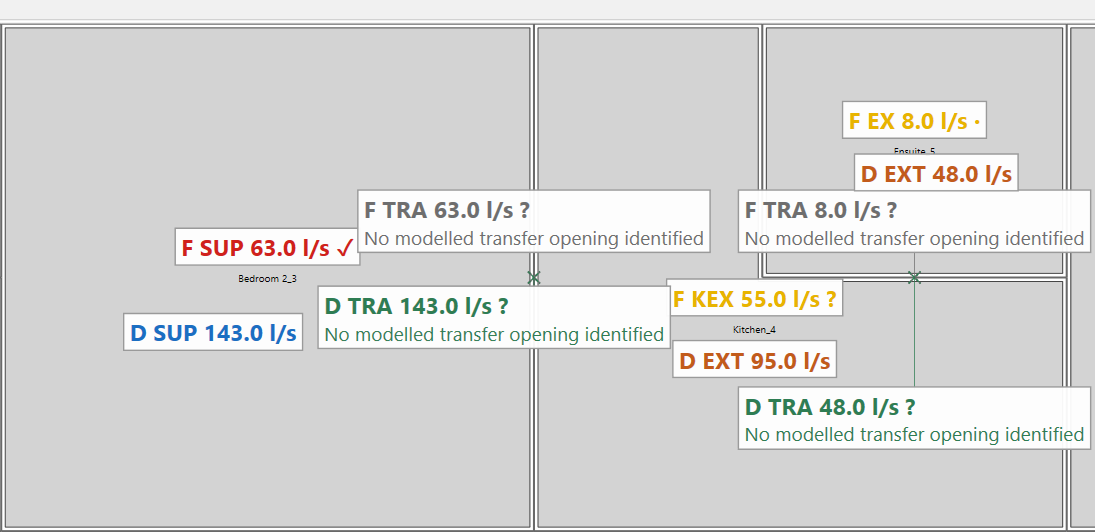
Calculation proposes; the engineer reviews. Here design airflow is raised above the requirement to address overheating, while the requirement and the unit’s capacity stay unchanged.
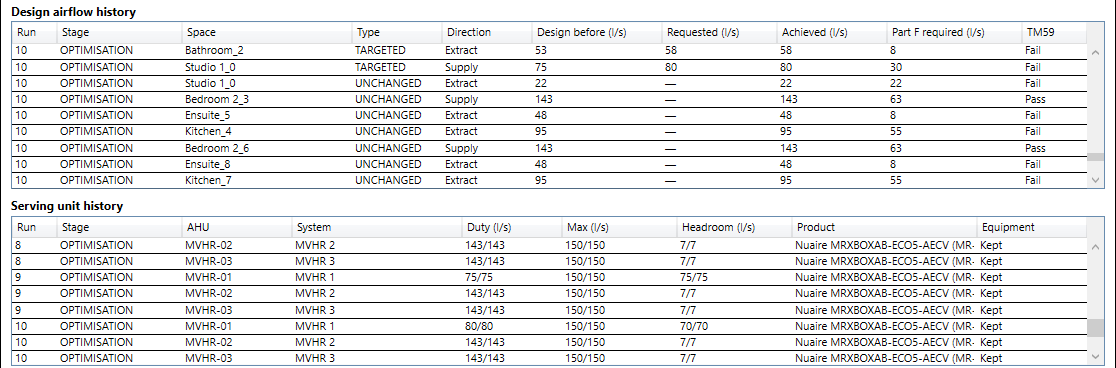
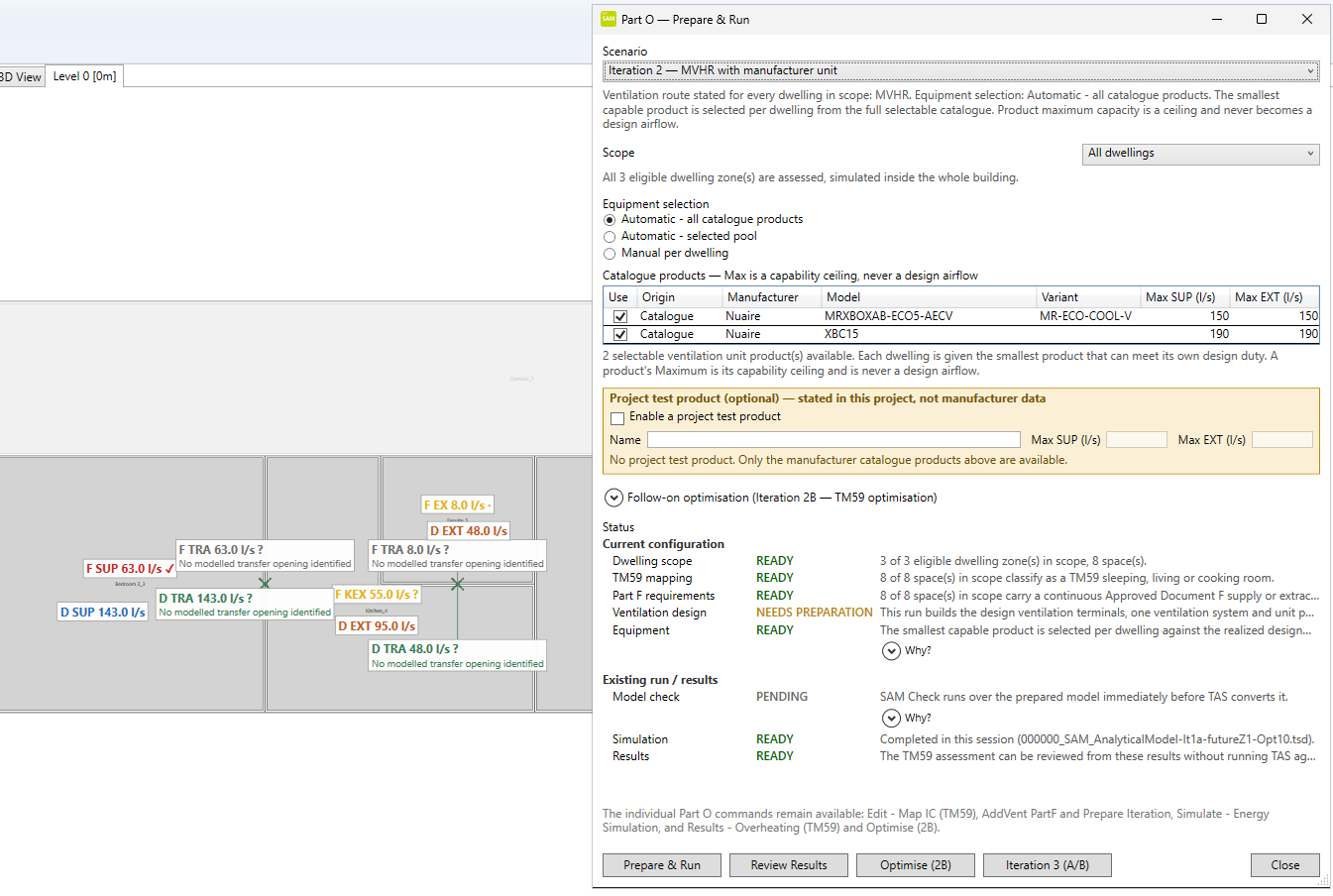
Each dwelling gets the smallest catalogue unit that meets its design duty; the unit’s maximum is a ceiling, never a design value. SAM then builds a repeatable simulation scenario and records its state.
The building is simulated in Tas and each room assessed against CIBSE TM59. On 2050s design weather this case still fails in 6 of 8 rooms — and SAM says so.
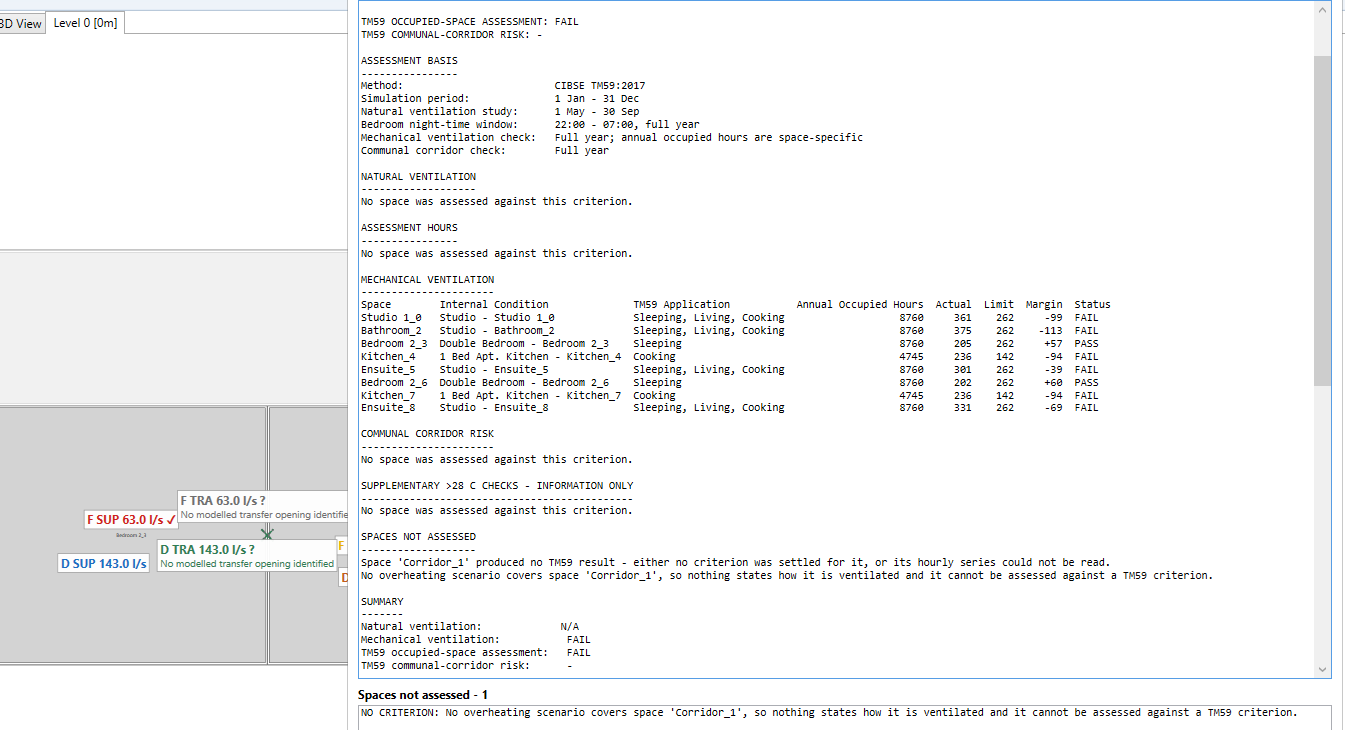
On the 2026-Q3 release line, the same design can be simulated through inter-zone airflows or through explicit ventilation systems in Tas, including selected-product cooling, with the unchanged TM59 assessment. Technical record
SAM supports engineering workflows that contribute to assessment methods; compliance depends on the complete project methodology. A TM59 pass is an overheating result, not a Part O compliance certificate.
A requirement is not a design, and a design is not what equipment can deliver. SAM keeps each quantity as its own object with its own authority, so one value never silently becomes another. The flagship workflow shows it with airflow:
The minimum the regulation demands.
Authority: RegulationWhat the engineer decides to ventilate at.
Authority: EngineerWhat the selected unit can deliver — a ceiling, not a target.
Authority: ProductWhat flows in the simulated or commissioned system.
Authority: OperationEach statement links to the public record behind it.
The core SAM model regression suite runs in continuous integration on every pull request and push.
CI test runsThe published installer is built and payload-checked in CI and was smoke-tested manually in Rhino, Grasshopper, the Revit add-in and Rhino.Inside.Revit. The wider clean-install, upgrade and uninstall acceptance matrix was not re-run for this build.
Release acceptance notesSAM’s TM59 figures checked against Tas’s own overheating report, with limitations stated.
Validation recordApproved Document F traced paragraph by paragraph — an assessment, not a certification.
Traceability matrixPublished at building-simulation venues since 2021, including Springer and BSA proceedings.
PublicationsVersioned Windows installer with release notes for Rhino, Revit and the SAM desktop apps.
Latest releaseDeveloped in the open; published at peer-reviewed building-simulation venues — from BIM-to-BEM model generation to psychrometrics and automated HVAC simulation.
M. Dengusiak, J. Ziolkowski, M. Dengusiak. Presented at BSA 2026, Bozen-Bolzano, June 2026; proceedings forthcoming.
M. Dengusiak, J. Ziolkowski. Lecture Notes in Civil Engineering 795, Springer 2026.
M. Dengusiak, J. Ziolkowski. Lecture Notes in Civil Engineering 796, pp. 693–708, Springer 2026.
M. Dengusiak, J. Ziolkowski, M. Dengusiak. Bozen-Bolzano University Press 2025.
M. Dengusiak, J. Ziolkowski.
Full list: ResearchGate – Michal Dengusiak.
An independent open-source project.